AI sales forecasting, product by product
Your own team of data scientists,
forecasting how much you will sell.
StockAI forecasts the sales of every one of your products: up to nine AI and statistical models compete on your own history, are tested on dates they never saw, and the one whose mistakes cost you least is kept. You add the orders your customers have already committed to and test scenarios before you decide. And with that forecast, every morning you know what is about to run out, how much to order and from which supplier.
Instant trial account: temporary username and password, 24 hours, no card.
A badly forecast sale costs you real money, both ways.
Most companies estimate how much they will sell on a spreadsheet, accumulated instinct and whichever buyer is on duty. That works up to a point — and the point arrives sooner than it looks.
AI sales forecasting: you upload your history, the AI does the rest.
From your sales file to a forecast per product, tested against your own past, and from there to the purchase order: eight steps, and you only do two, upload the file and record what arrives. StockAI works through everything else, product by product, and every step leaves something you can check on screen.
Your sales
A CSV or Excel file exactly as it comes out of your system. StockAI works out which column is the date, the product and the quantity sold.
Date, product and quantity: that is enough
Review and clean-up
Before training, every product is checked: missing dates, outliers, too little history. If the file would produce a wrong forecast it does not run until you choose how to fix it, because filling gaps with zero and interpolating them say different things about what happened.
With your stock history, days with nothing on the shelf stop counting as days with no demand
A model competition per product
Each product is classified by how it sells (steady, seasonal, intermittent or volatile) and the models that handle that pattern best compete, out of nine available: gradient-boosted trees, classical statistical models and a neural network.
LightGBM, XGBoost, ARIMA, SARIMAX, Prophet, ETS, Croston, LSTM and a global model
Tested against the past
Each model has the last stretch of your history hidden from it and is asked to forecast it, over several cut-offs. The one whose mistakes cost least wins, and it has to beat two naive forecasts.
Falling short weighs three times more than overshooting
Forecast with a range
The winner is trained again on your whole history, the latest weeks included, and projects demand with a likely range around it.
Daily, weekly, monthly or quarterly
Signal and quantity
Forecast demand is set against your stock on hand and your supplier’s lead time. Every product lands on ORDER NOW, ORDER SOON, OK or OVERSTOCK, with a suggested quantity.
The rule is published and can be done by hand
Purchase order
The order comes out grouped by supplier, with the reason for every line. You review it, adjust it and send it by email, or by WhatsApp.
Exportable as CSV or PDF
A reception that teaches the lead time
When you record an arrival, StockAI notes how many days it really took. From a supplier’s third delivery it plans with that lead time, not the promised one.
And that lead time feeds back into the signal
How it is calculated, in plain language
An AI competition for every product. The cheapest mistake wins.
A product that sells every day is not forecast the way one that sits for weeks without moving is. So StockAI does not run one model over the whole catalogue: it puts machine-learning models, a neural network and classical statistical models in competition on each product’s history, and plans with the winner. It is the work a data-science team would do, running on its own across your whole catalogue.
Who competes, depending on how it sells
A product can carry two patterns at once, seasonal and volatile for instance, and then the models for both compete. The classification only narrows the models you have active: it never trains one you did not choose.
In every competition
A global model, trained on your whole catalogue
It competes on every product. It helps most on those with little history or intermittent sales: it learns from how the rest of your catalogue behaves, which no single-product model can do.
Two naive forecasts as the yardstick
Repeat the last value, and repeat last season. They cannot win, but they do measure: if no model beats them on a product, the run tells you instead of hiding it.
What makes this AI engine different
The winner is the one whose mistakes cost least
Running out loses you sales; overstock ties up cash. They do not cost the same, so the winner is chosen on a cost where falling short weighs three times more than overshooting, measured across the whole horizon you are buying for.
A stockout is not mistaken for no demand
If a product ran out, its zero sales do not say nobody wanted it. With your stock history, StockAI marks those days and estimates what would have sold, so it does not learn the stockout as a slump and under-order again.
Tested on dates it never saw, trained on all of them
The competition is judged on a stretch the model never saw. Once chosen, the winner is retrained on the full history, so your latest weeks of sales are in the forecast you buy from.
If the file is not enough, no number is invented
A product without enough history stays out of the forecast and shows as NO DATA, with no suggested quantity. And a file that would produce a wrong forecast is stopped before training, with the explanation on screen.
And an AI analyst you can just ask
Ask your forecast and your inventory what you would ask your best analyst: "which supplier is running late?", "why did this category go up?". It answers about your own account, reading the same signal and the same orders you see on screen, and every answer says where it came from.
- It writes and explains; order quantities are computed by the forecasting engine, not the chat.
- It uses an external language model. If that is unavailable, the screen says so before you type.
From the alert to the order sent, before your second coffee.
What you do with the forecast. This is what a buying day looks like when the AI has already forecast your sales overnight. Every step is a screen or a channel that exists in StockAI today.
Before you arrive
What is urgent is already waiting
The daily summary of products that moved into risk reaches your inbox, and your WhatsApp. If you left the scheduled recalculation on, the list is already up to date with yesterday’s sales.
On the dashboard
One screen, the only thing to decide
How many products are at risk today and this week, a written summary of the day’s risks, opportunities and actions, and the orders that should already have arrived.
In inventory
What to order, and how much, already worked out
Your whole catalogue in ORDER NOW, ORDER SOON, OK and OVERSTOCK. The suggested quantity already accounts for what is on its way and is measured against each supplier’s real lead time.
In orders
The order comes out grouped by supplier
With the reason for every line. You review it, adjust it and send it by email (or by WhatsApp), or export it as a PDF for your system.
When the goods arrive
Every reception teaches it something
You record the arrival, complete or partial, and StockAI notes how many days it really took. From the third delivery, that supplier is planned with its real lead time.
When a question comes up
You ask your AI analyst
In the app or on WhatsApp: what is in the red, which orders are still pending, how the forecast looks. It answers with your own account’s figures and points you to the screen where each thing is done: approving and receiving orders stays yours, in the app.
Complete sales forecasting, and everything you decide with it. With an API, an MCP server and a WhatsApp bot.
Everything StockAI does: the forecast first, then the purchasing, inventory and suppliers planned from it.
AI sales forecasting
- A model competition per product, tested against your own past
- A likely sales range around every forecast
- Stockout days are not learned as missing demand
- Your country’s holidays and days of the month as model variables
- Daily, weekly, monthly or quarterly
- Scheduled recalculation: every Monday, daily, on business days, hourly or on the 1st of the month
Committed demand and planning
- Orders your customers have already committed to, with date, quantity and probability, added to the forecast
- Every committed order that moved a quantity, named on the row
- Scenario simulator: promotions, delays and higher demand, up to 50 rules per scenario
- Demand plan versions with sign-off, S&OP style
- The approved plan, measured afterwards against what sold and against the statistical forecast
Purchasing
- A list of what to order today, sorted by urgency
- A suggested quantity per product, net of what is already on its way
- Purchase orders grouped by supplier, with the reason for every line
- A daily summary of the products at risk, by email, and by WhatsApp
- Sent to the supplier by email, or by WhatsApp; exported as CSV or PDF
- An optimiser for the lowest-total-cost order, fixed freight included
- Volume price breaks: how far the next tier is
Suppliers
- The real lead time, learned from the third reception
- Scorecard: declared against real lead time, on-time and complete deliveries
- Each supplier’s order cycle inside the reorder point
- Service-level and lead-time rules per supplier or category
Inventory and capital
- A signal per product: ORDER NOW, ORDER SOON, OK and OVERSTOCK
- Several warehouses, each on its own and consolidated
- Transfers between warehouses before buying
- Transfers between legal entities approved by an administrator, and reversal of a received transfer
- One view of your stock: which source is current, which fell behind and what waits for your decision
- ABC-XYZ classification to place the safety stock
- Bills of materials for manufacturing
- Money sitting in products that do not turn, in plain view
- Overstock flagged before it is clearance time
- Reports in Excel and PDF, ready to share
- A monthly summary built from your own records
- Your figures in your company’s currency
Integrations and team
- Upload by CSV or Excel, exactly as it leaves your system
- A read-only connection to your database: Postgres, MySQL, SQL Server, Oracle or MongoDB
- SFTP or S3 folders: the file your ERP exports goes in by itself, and a suspicious one waits for your decision
- Approved orders out to your ERP: CSV or Excel, plus import layouts for SAP, Business Central, NetSuite, Odoo and Oracle (written from their documentation)
- Signed webhooks with retries, and clients for Python and TypeScript
- Ready-to-import templates for n8n
- A REST API with the app’s actions, for your own system
- A read-only MCP server for AI assistants
- Administrator, analyst and read-only roles
- Internal messaging, with a WhatsApp heads-up
What the forecast has ready every morning.
Real StockAI captures with sample data inside. Not mock-ups.
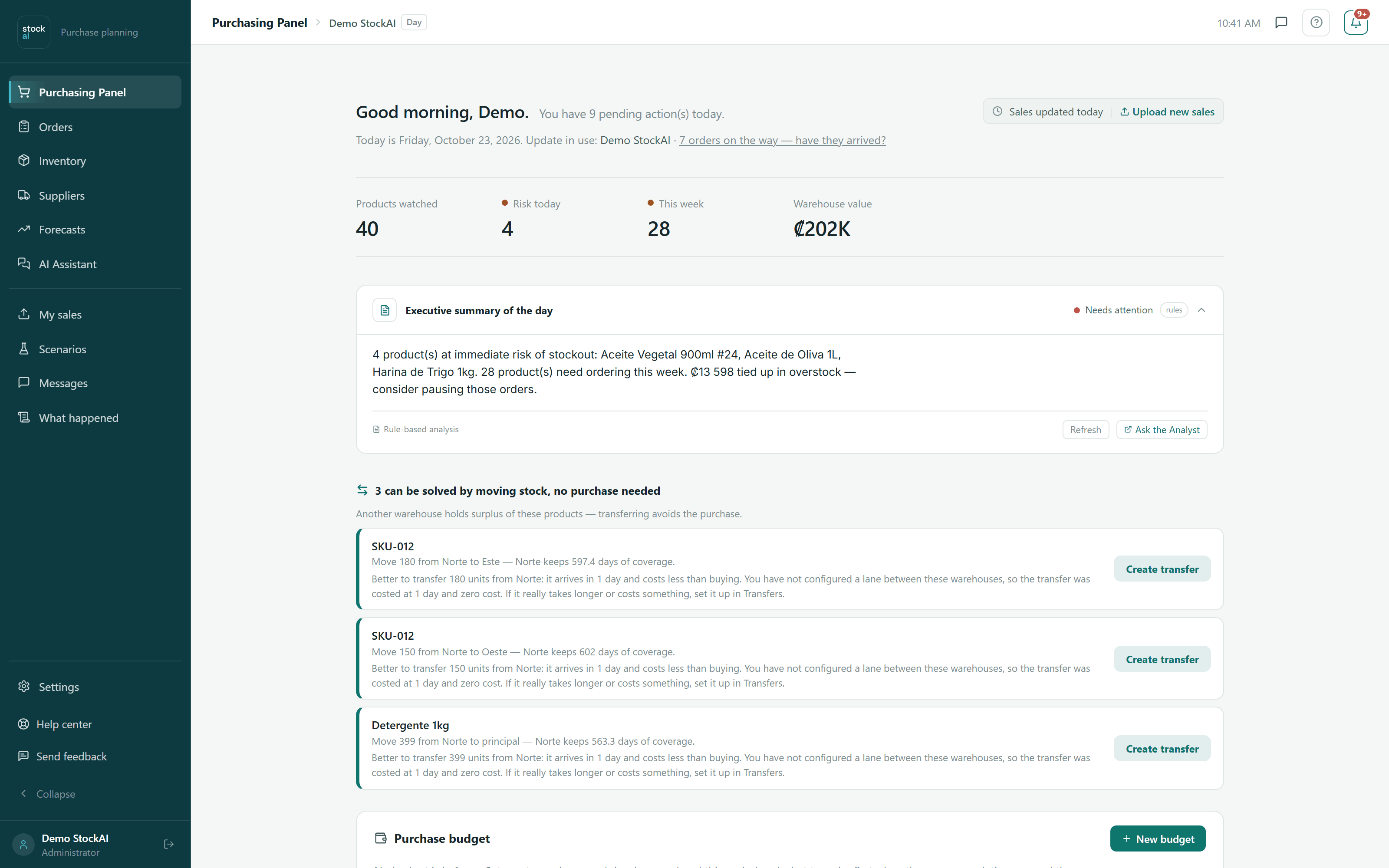
Purchasing dashboard
The first thing you see. It gathers on one screen the only thing you have to decide today: what is about to run out, which orders are on their way, and where to start.
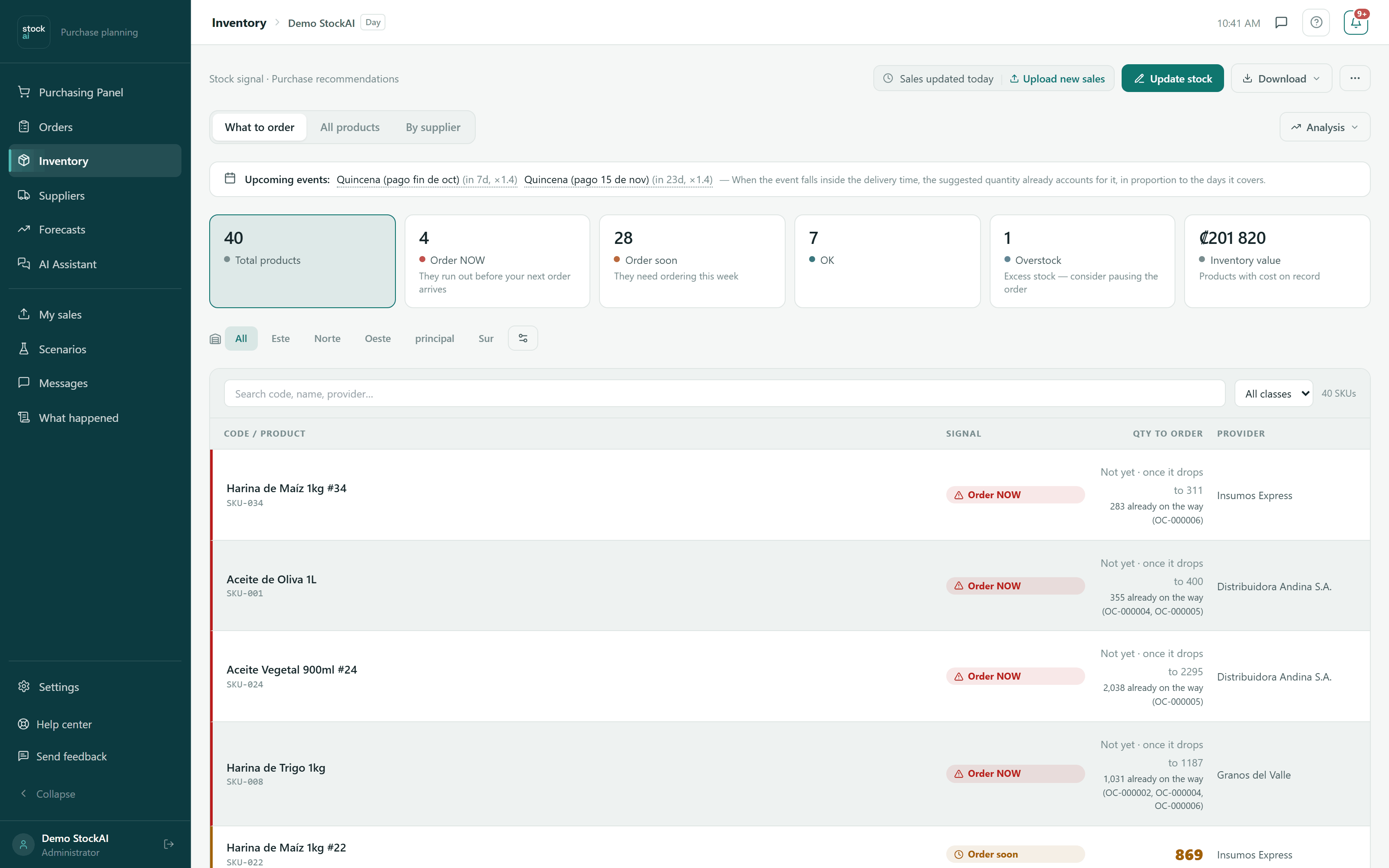
Inventory
Your whole catalogue in four states, and for each product the quantity to order already worked out against its supplier’s real lead time. Nothing to interpret.
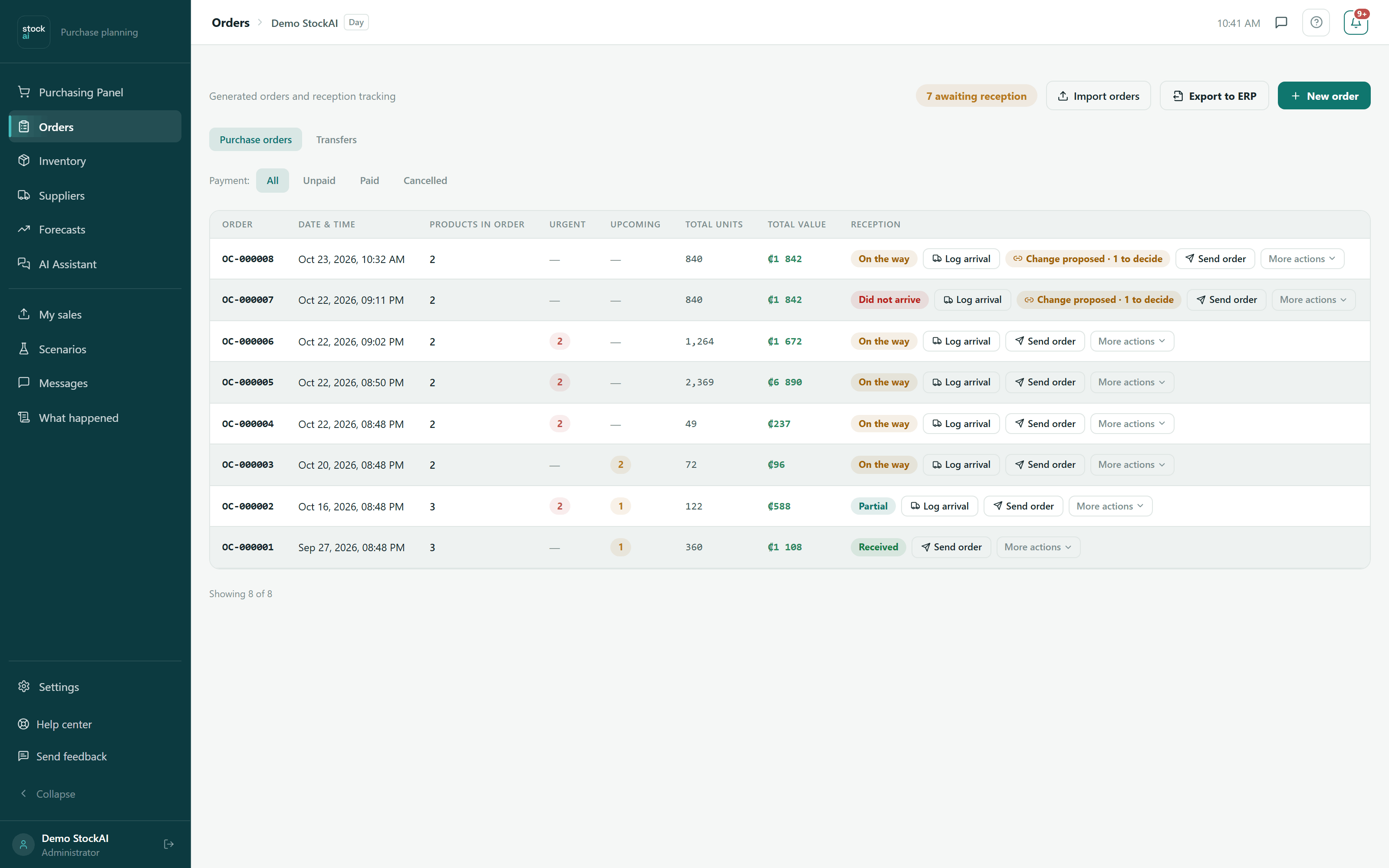
Orders
The orders you generated, from the moment they leave to the moment they land. Every reception you record teaches StockAI how long that supplier really takes.
Built for real operations, yours included.
Demand does not behave the same way at a wholesaler as at a retailer or a production plant. StockAI forecasts each product’s sales from how it actually sells in your operation, and plans purchasing from that forecast.
Excel takes notes. Instinct remembers. StockAI forecasts.
Excel is for writing things down and an experienced buyer is worth gold, but neither can forecast thousands of products every day. The problem shows up when the business grows and the spreadsheet and the memory stop keeping up.
Reorder point and signal: how StockAI decides when to buy.
The AI forecasts; the decision to buy rests on a rule in plain sight. No recommendation comes out of a black box: you can do the arithmetic by hand and check it gives the same answer.
The arithmetic
Coverage = stock on hand ÷ forecast daily demand: how many days you last if nothing else arrives. That figure is compared against two references. Your supplier’s lead time, the days they take to deliver once you place the order. And your reorder point: what you will sell while you wait for that order, plus a safety buffer.
It is the logic you already run in your head, only applied to the thousands of codes you never get to review: if what you have cannot cover the wait, it is time to order.
You decide the buffer: it comes from the service level you choose, for the whole company, per supplier, per category or per product. And if you order from a supplier on a fixed cycle, that interval goes into the reorder point too. And the cut-offs are yours too: “order now” below half the lead time and “overstock” from three times the lead time come as defaults, but you change them for the whole company, per supplier or per category, and before saving you see how many products would change signal.
You sell 20 units a day of a product, your supplier takes 15 days to deliver and your safety buffer is worth 5 days of sales. Your reorder point lands at 20 days: 400 units. With that, the four signal states become concrete quantities — the ones in the table below. Change any of the numbers and the cut-offs move on their own, product by product.
What you need to get going — and what you do not.
The most common reason a tool like this ends up unused is not the price: it is finding out, three weeks in, that a data project had to happen first. Here is the whole list, so you can check it now.
What you do need
What you do not need
Who StockAI is for, and who it is not.
Better to know before you upload the first file.
- You buy goods from suppliers with a delivery lead time: you are a distributor, wholesaler, shop or manufacturer.
- You have hundreds or thousands of products and today decide purchases with an Excel sheet or the buyer’s memory.
- Your team is small and has no data analyst.
- You have a sales history in CSV or Excel, with at least 20 periods per product.
- You are looking for an invoicing system, accounting or a point of sale: StockAI does not invoice.
- You need traceability by lot or by each unit’s expiry date: it does not track it.
- You want the tool to buy by itself: it suggests, and you send the order.
- Your business is services, with no inventory to replenish.
- You launch new products and want a forecast without history: without enough data, no number is invented.
The same complete engine on every plan. What changes is the room.
AI forecasting, the signal, purchase orders, warehouses, the optimiser, the simulator, the alerts and the analyst are all complete from the Free plan up. What grows from one plan to the next is the room: products, users, warehouses. The API, the MCP server and the WhatsApp bot start on Pro.
- No card for the Free plan
- The Free plan does not expire
- Change plans without migrating data
Forever
To get started, and for a small business. No card, no expiry.
- Products (SKUs): 100
- Users: 2
- Warehouses: 1
For the distributor that has grown: a team, a few warehouses and its own system plugged in through the API.
- Products (SKUs): 1,000
- Users: 5
- Warehouses: 3
- With the API, the MCP server and the WhatsApp bot
For a large catalogue and a purchasing team spread across a network of warehouses.
- Products (SKUs): 10,000
- Users: 20
- Warehouses: 10
- With the API, the MCP server and the WhatsApp bot
Annual contract
For companies that buy months or years ahead, with no ceilings.
- Products (SKUs): Agreed in the quote
- Users: Agreed in the quote
- Warehouses: Agreed in the quote
- With the API, the MCP server and the WhatsApp bot
What each plan includes
For companies that buy months or years ahead, with no ceilings. It is not a different product: it includes everything, with the ceilings lifted and agreed in the quote.
What it includes
- Everything in Max (API, MCP server and WhatsApp bot), with the ceilings agreed in the quote
- Many warehouses and many users, with a purchase-order approval workflow and an audit trail
- Your company's single sign-on (SSO), physical stock counts, data intake by e-mail and the API
- Your customers’ committed orders, with date, quantity and probability, added to the forecast
- Onboarding support and a named contact person
Anything not on this list is not promised: it is discussed and written into the quote.
The starting price is a reference: the final quote is agreed with you, in a conversation.
Start free today. When you outgrow it — a catalogue that grew, a second warehouse, a third person on the team — move to Pro or Max on the same account, with nothing to migrate.
Want it on your own servers?
We also sell the complete StockAI source code, to install on your own infrastructure and run as your own, with no plans and no ceilings.
What you get
- The complete source code: the forecasting engine, the API, the frontend and the worker
- Every feature in the product: AI forecasting, the stock signal, purchase orders, warehouses, the optimiser, alerts, the API, the MCP server and the WhatsApp bot
- Installation on your own server with Docker Compose, with your data only on your infrastructure
- The installation panel to configure email, WhatsApp, AI and the rest of the services
Write to us and we will close the purchase and the delivery details with you.
Your data is yours. And the rules are in plain sight.
What is worth knowing before you upload your first file.
Security and privacy, in detailEach company sees only its own
Every query is filtered by company. Your sales, stock and suppliers never mix with anyone else’s, and your forecasts are trained only on your own history.
Everyone with their own permission
Administrator, analyst or read-only. Whoever only looks, only looks: they cannot create orders or change data.
Encrypted credentials
What you connect — such as access to your database — is stored encrypted. Your team’s passwords are stored as bcrypt hashes: nobody can read them, us included.
Take your data with you, or have it fully erased
If you ever leave, we hand you all your data in a ZIP file and erase the whole account: every table and every file, not just the main record.
Not a black box
The rule that puts a product in the red is published on this page, and you can do it by hand to check it gives the same answer.
See the rule
Made in Costa Rica, for the people who need to know how much they will sell.
StockAI exists so distributors, shops, wholesalers and manufacturers across Latin America stop guessing their sales. Most of them estimate on a spreadsheet and instinct because forecasting tools were built for large companies with data teams — not for an operation handling thousands of products with a small one.
StockAI takes the sales history you already have (a CSV or Excel) and turns it into a per-product forecast you can check, and from there into concrete decisions: what to order, how much, from whom and when. No analyst required. Made in Costa Rica, built for how companies in the region actually work.
Answers to the most common questions.
If you have a question that is not here, write to us directly. We answer within 24 hours.
Write to us →Put your own AI to work forecasting your sales. Today.
Three ways to start, depending on how much you want to commit right now. All three lead to the same product.
Create your account
With the whole engine. Upload your sales file and see your first forecast, and with it your first list of what to order.
Create my accountLook before giving your email
An instant trial account with sample data. It lasts 24 hours and is then erased.
Try it without signing upTalk to us
For the corporate plan, the source code, or to see it with your data and someone beside you. We answer within 24 hours.
Sales and contact: contacto@stockai.es. Phone: +506 7186 2820.
Sales forecasting made in Costa Rica, for companies across Latin America.