The stock signal
Each product gets one of five signals by comparing how much selling time your stock covers with how long your supplier takes to deliver. Here is the exact rule and what you can adjust.
On this page
The stock signal answers one question per product: will the next order arrive before you run out? It compares two numbers:
- Cover: how much selling time the stock you hold today lasts, at the rate StockAI forecasts (including the effect of any event or season you recorded).
- Lead time: how long your supplier takes from your order to the goods being in your warehouse. See Learned lead time.
The five signals
- Order NOWCover is less than half the lead time (factory value 0.5). You are already late: even ordering today, you will probably run out before it arrives.
- Order soonCover does not reach your reorder point: what you sell while the order travels plus your safety buffer. Time to order.
- OKCover is above the reorder point and below the overstock threshold. Nothing to do.
- OverstockCover reaches 3 times the lead time (factory value) or twice your reorder point, whichever is larger. A product with stock and no forecast demand is overstock too.
- No dataThe product has no recorded stock or no forecast. Not an error: an unconfigured product. See No data.
In the database and the API the signals are stored as PEDIR_YA, PEDIR_PRONTO, OK, SOBRESTOCK and SIN_DATOS.
Special cases
- Empty shelf, no demand: a product with no stock and no forecast sales is OK, not overstock: nothing to order and nothing sitting idle.
- Stock, no demand: a product holding stock with no forecast sales is Overstock. No sale justifies that inventory.
- Same cover, different signal: 10 days of stock is comfortable with a supplier who delivers in 5 and critical with one who takes 30. The signal always compares against each product's own lead time.
The signal and the suggested quantity
Only Order NOW and Order soon carry a quantity. On OK, Overstock and No data the suggested quantity is zero. Because "Order soon" lights up exactly at the reorder point, a line that tells you to buy never comes with zero units.
Adjusting the thresholds
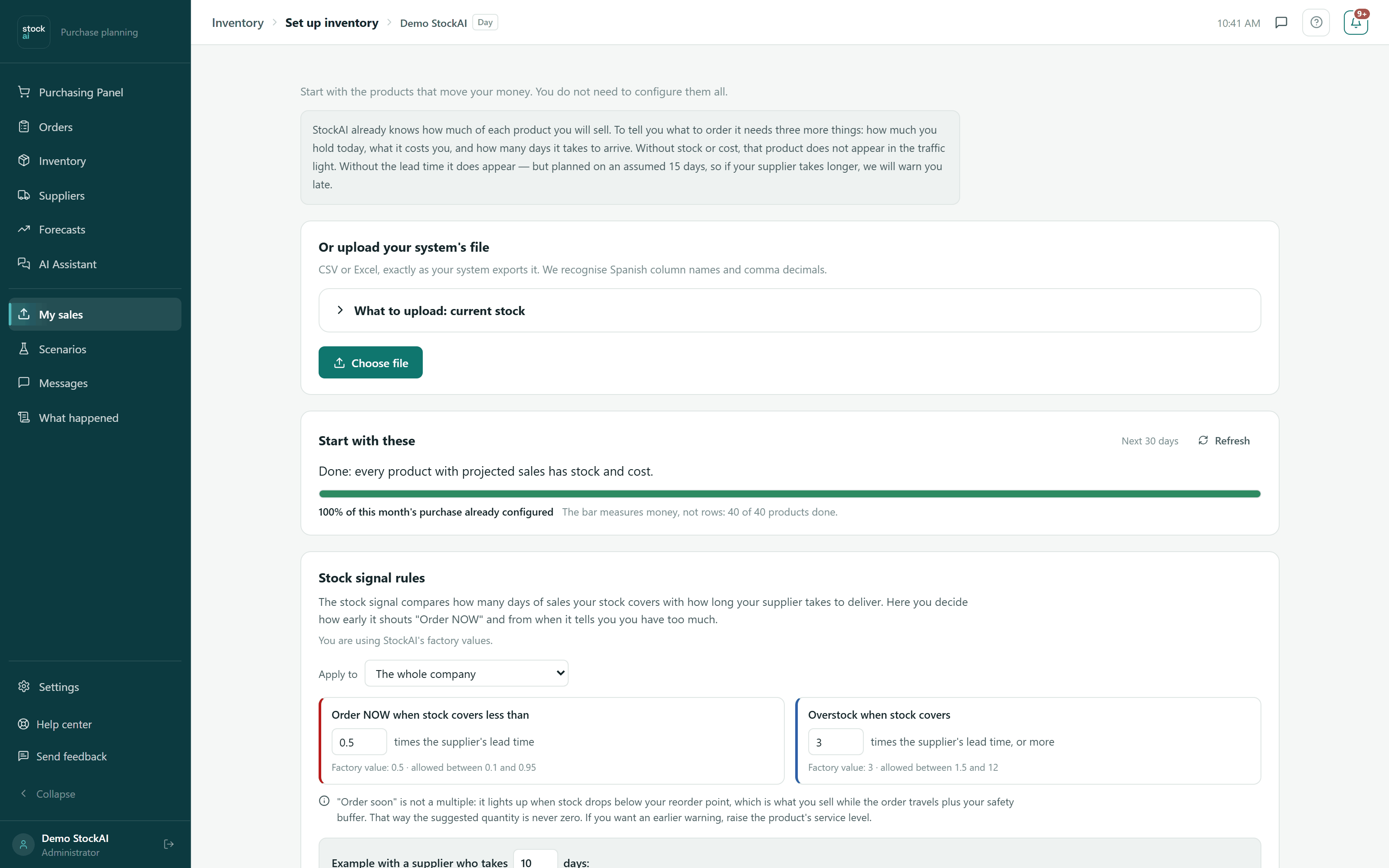
In Set up my inventory, the "Stock signal rules" panel lets you change the two lead-time multiples:
| Threshold | Factory value | Allowed |
|---|---|---|
| "Order NOW when stock covers less than" … times the supplier's lead time | 0.5 | 0.1 to 0.95 |
| "Overstock when stock covers" … times the supplier's lead time, or more | 3 | 1.5 to 12 |
- Under "Apply to" you pick "The whole company" or one supplier. A supplier rule is an exception that overrides the company rule for its products. StockAI also honours category rules: the most specific wins (supplier, then category, then company, then factory values).
- Both values are always saved together, and "Order NOW" must stay below "Overstock".
- Before you save, the screen tells you how many of your products would change signal and shows examples.
- "Back to factory values" undoes your changes (it also tells you how many products would change).
- Only an analyst or an admin can change these rules. Once saved, the stock signal, the 8:00 alerts and the purchase suggestions use the new values.