Settings: the index of every setting
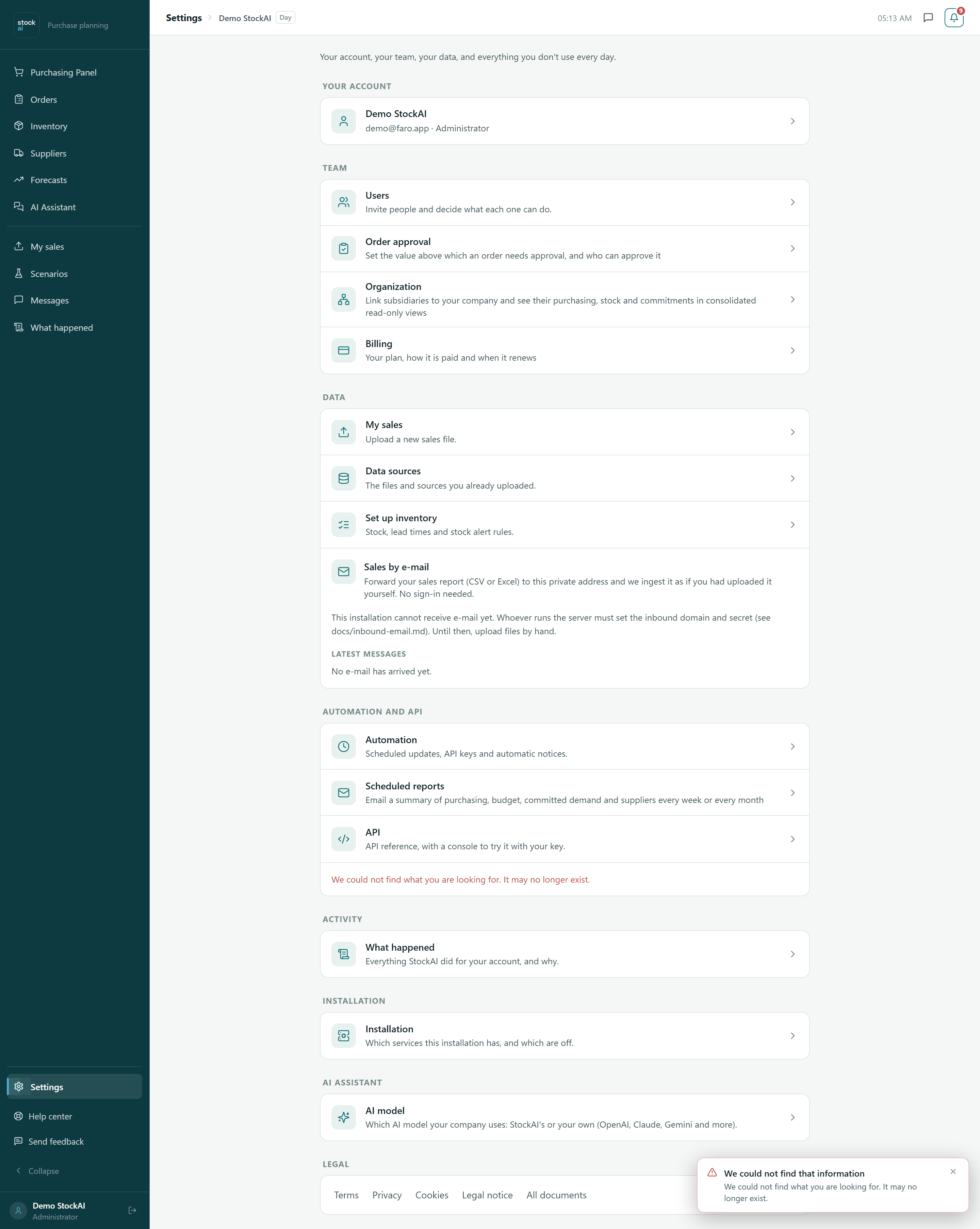
The screen that gathers everything you do not use every day: your account, your team, your data, automation, activity and the installation. It edits nothing itself: each row opens the screen that does.
On this page
Open Settings from the last item of the sidebar, the gear. The sidebar only carries the daily screens; everything you set up once and check now and then lives here, one click away. The usual addresses still work, so you can also reach each screen by typing its route or from the command palette.
Who sees what
Every role can open Settings, but not everyone sees the same rows. A row for something your role cannot use, or that your account does not need yet, is left out (it is not shown locked):
| Row | Administrator | Analyst | Read only |
|---|---|---|---|
| Users, Order approval, Automation | Yes | No | No |
| Installation | Yes, if the account operates the installation | No | No |
| Organization, Billing, My sales, Data sources, Set up inventory, Scheduled reports | Yes | Yes | Yes |
| API | Once the account has an API key | Same | Same |
| What happened | Once there is more than one person in the account | Same | Same |
| AI model | Yes (edits it) | Yes (reads it) | No |
| Sales by e-mail and Continuous audit export cards | Yes | No | No |
The sections, one by one
- Your account
- Your name, email and role. Opens My account.
- Team
- Users (invite people and decide what each can do, see Users), Order approval (the value above which an order needs approval, and who approves it), Organization (subsidiaries and consolidated views, see Organization) and Billing (your plan and how it is paid, see Billing).
- Data
- My sales (upload a new file), Data sources (what you already uploaded) and Set up inventory (stock, lead times and alerts).
- Sales by e-mail
- Administrators only. A private address you forward your sales report to (CSV or Excel), and StockAI takes it as if you had uploaded it, without signing in. If the installation cannot receive mail yet, the card says so and asks you to upload files by hand meanwhile. Below, Latest messages lists what arrived.
- Automation and API
- Automation (scheduled retraining, API keys and automatic notices, see Automation), Scheduled reports (see Scheduled reports) and API (see API screen). While nothing is connected, the Automation row reads "Optional: automatic alerts and updates to other systems".
- Continuous audit export
- Administrators only, inside Automation and API. Streams the audit trail to your security system (SIEM).
- Activity
- What happened: everything StockAI did for your account, and why. See Activity.
- Installation
- Which services this installation has, and which are off. See Installation.
- AI assistant
- AI model: which model your company uses, StockAI's or your own. See AI model.
- Legal
- Terms, Privacy, Cookies, Legal notice and All documents.