Supplier scorecard, step by step
Compare what each supplier promises with what it delivers: real lead time, on-time deliveries, promises kept, fill rate and purchased value, all from the arrivals you record.
On this page
Open it with the "Scorecard" button in Suppliers, or at /proveedores/scorecard. It is read-only and every role sees it. "Back to Suppliers" takes you back.
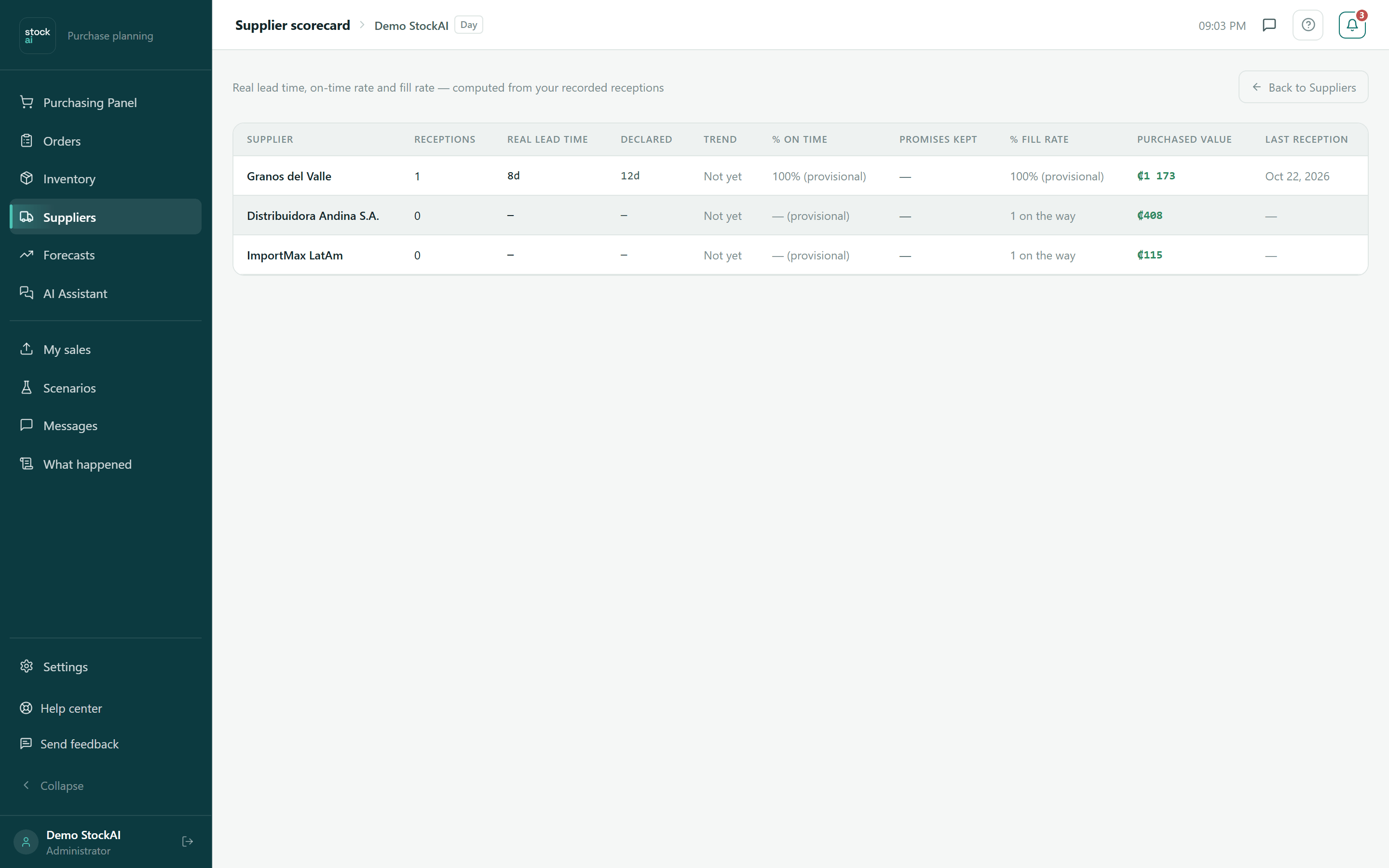
Every figure comes from the orders and receptions you logged in Orders. A supplier appears as soon as it has orders; until you log arrivals from them, their figures stay at "—" or "Not yet".
The columns
- Supplier
- The name.
- Receptions
- How many of their arrivals you have logged: the sample size.
- Real lead time
- The observed range, from minimum to maximum (for example 8–14d), and below "8 in 10 within X d, 19 in 20 within Y d". "Inconclusive" if every delivery arrived the same day it was ordered.
- Declared
- The lead time on its record. "—" if nobody filled it in: the 15 days we assume are not a promise from the supplier.
- Trend
- +N d if its recent time left its own normal range (hover for the detail), Stable, or Not yet with a single reception.
- % On time
- Deliveries whose real time was at or below the declared one. Green from 70 %, amber from 40 %, red below. With few deliveries it carries "(provisional)".
- Promises kept
- Of the dates promised by the supplier that you accepted, how many were kept, and in brackets how many were measured. "—" if you never accepted one.
- % Fill rate
- What share of what you ordered arrived. "N on the way" while their deliveries are still inside the promised window; "(provisional)" with few deliveries.
- Purchased value
- What was received, at cost. "≥" if some lines have no cost; "—" if none has (it is not zero).
- Last reception
- The date of the latest arrival.
If any supplier drifted, above the table you read "N suppliers have drifted from their historical lead time", detected with a 3-sigma statistical control rule over each supplier’s own history.
When it is empty
- No receptions recorded yet
- You have not logged any arrival yet. Do it from Orders.
- You recorded arrivals, but with no supplier assigned
- The arrivals were saved, but the products have no supplier: set it on each product and the scorecard fills up with the next arrivals.
On a phone each supplier is a card with the same figures and the notes that explain each one.